
Download Phone Dial by PC – phone dial, PC dialer, call management, RS-232, serial interface, keyboard shortcuts, clipboard dialing, redial, incoming call, manual entry, COM port
Overview
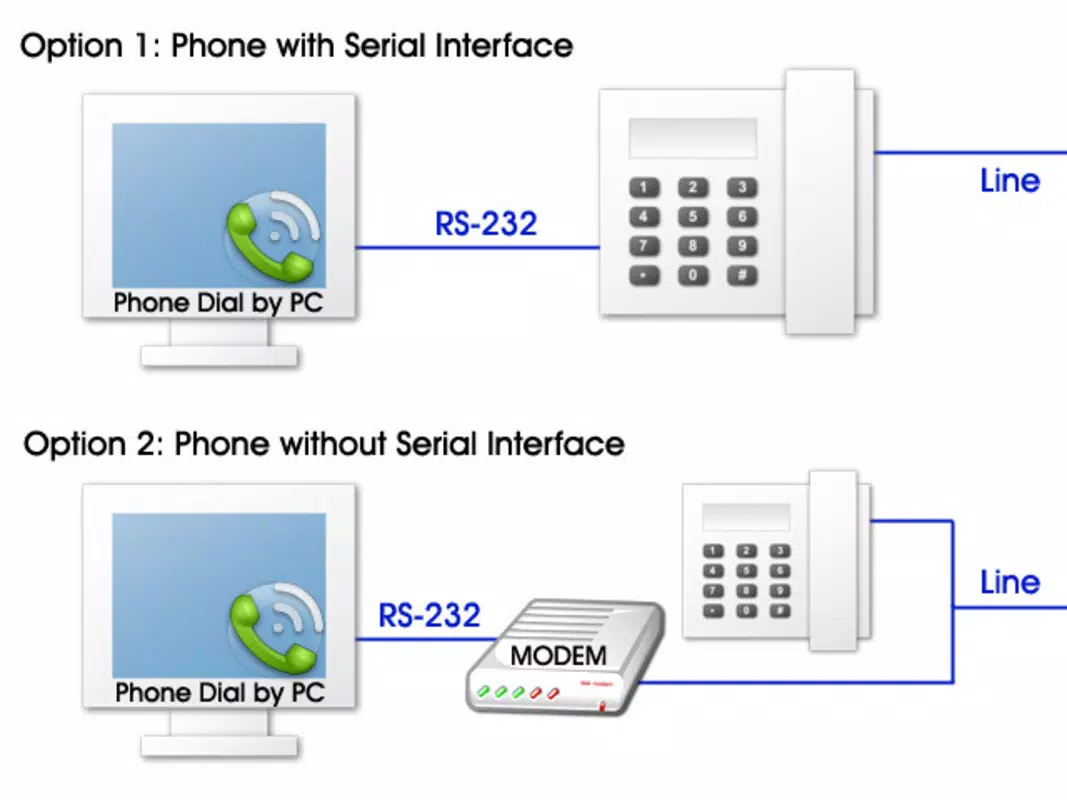
Phone Dial by PC is a specialized communication utility designed to bridge the gap between traditional telephony and modern computing environments. The application enables users to manage phone calls directly from a Windows-based computer by connecting a telephone to the computer’s COM port through an RS-232 serial interface. This setup is particularly useful for users who rely on hardware telephones in professional or industrial settings, such as call centers, technical support desks, or legacy systems where computer integration with telephony is essential. By allowing direct control over dialing, call pickup, and call termination, the app enhances workflow efficiency and reduces the need to switch between devices.
Target users include technical professionals, system administrators, and individuals working with older telephony hardware that lacks modern IP or USB connectivity. The app is especially relevant in environments where automation and integration with desktop applications are required. While the developer did not provide additional technical details about the app’s architecture or broader ecosystem role, its focused functionality suggests it serves as a niche but valuable tool within specific workflows. Real-world use cases include automating call logging, integrating telephony with CRM systems, or enabling hands-free call management during extended computer use. Its long-standing presence since 2013 indicates a stable, maintenance-focused product tailored to a dedicated user base.
Key Features & Functionality
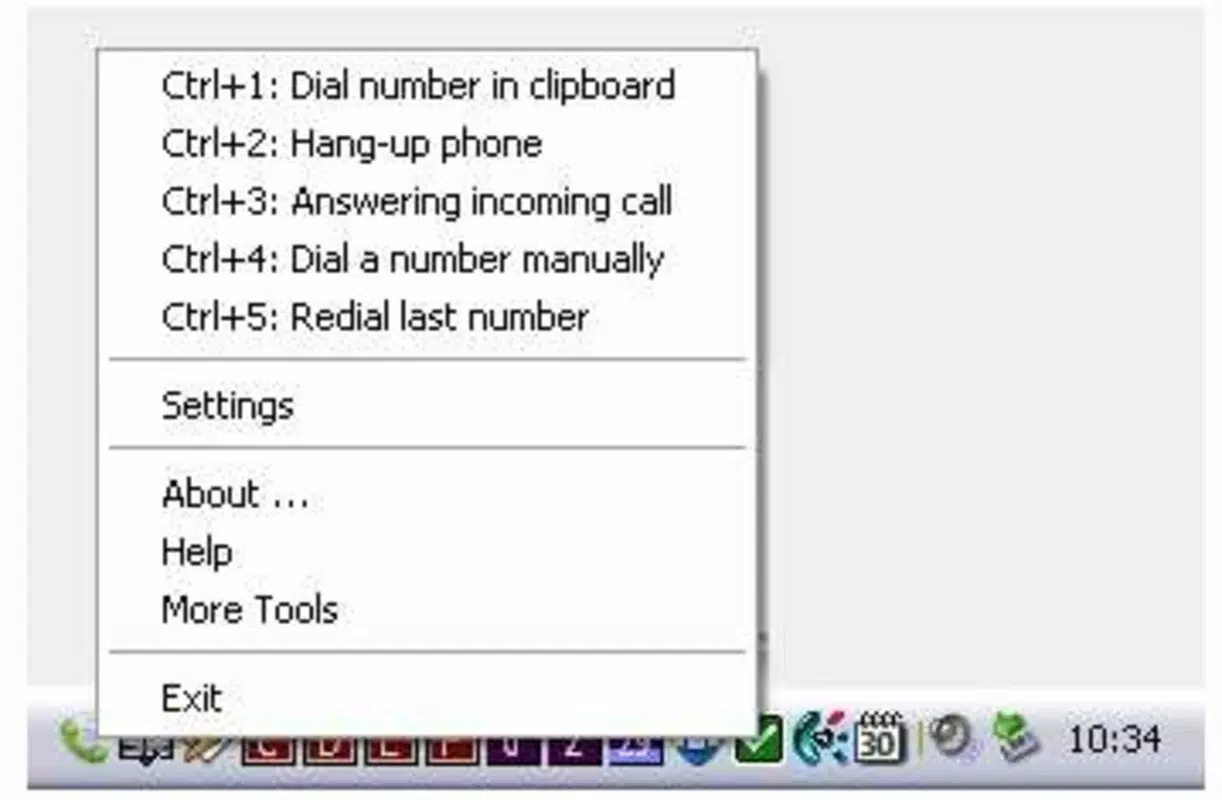
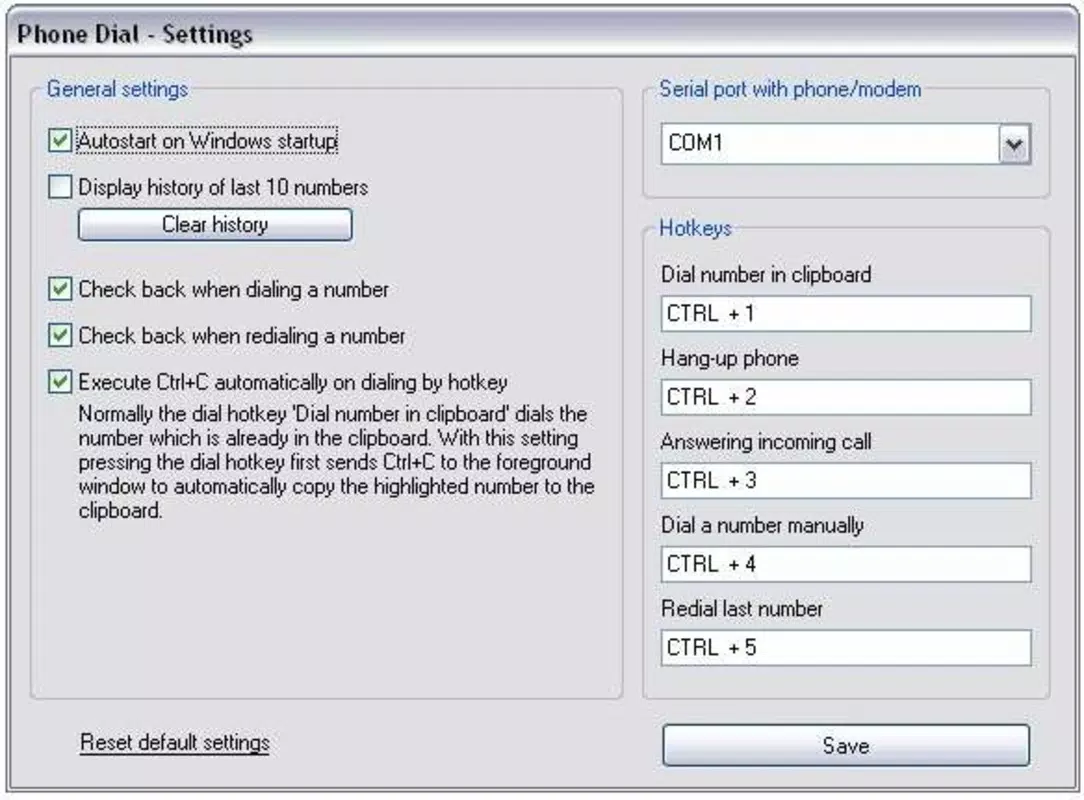
- Keyboard Shortcuts: Users can assign custom keyboard shortcuts to initiate dialing, answer incoming calls, or hang up. This feature enables rapid call management without interrupting workflow, ideal for multitasking professionals.
- Clipboard Dialing: The app automatically detects and dials any phone number copied to the system clipboard. This functionality streamlines call initiation from emails, documents, or web pages, reducing manual entry errors.
- Redial Functionality: Phone Dial by PC retains the last ten dialed numbers, allowing users to quickly redial without re-entering numbers. This is especially useful for frequent contacts or repetitive tasks.
- Incoming Call Management: The application supports direct response to incoming calls from within the computer interface, ensuring users remain engaged with their primary tasks while managing communications.
- Manual Number Entry: Users can input any telephone number directly into the app’s interface, offering full flexibility regardless of the number’s source or format.
Each feature is designed to minimize context switching and improve productivity in environments where phone calls are a regular part of the workflow. For example, a support technician can copy a client’s number from a ticket system and instantly dial it using a predefined shortcut, all without leaving their current application.
Interface, UX & Performance
The user interface of Phone Dial by PC is minimal and focused on core functionality, reflecting its utility-driven design. It likely features a streamlined layout with essential controls—dial pad, call status indicators, and shortcut configuration—ensuring that users can perform tasks quickly and efficiently. Navigation is expected to be straightforward, relying on keyboard input and context-sensitive actions rather than complex menus.
Although the developer did not list formal performance metrics, the app’s small file size of 3.8 MB suggests it is lightweight and optimized for low resource consumption. It is designed to operate in the background while other applications run, maintaining responsiveness even during intensive computing tasks. Stability is likely prioritized, given the app’s long-standing release history since 2013. Users can expect consistent performance across different Windows device categories, including desktops and laptops, though specific compatibility details were not disclosed. The app’s reliance on hardware-level serial communication implies it functions reliably when properly connected, but performance may vary based on the quality of the RS-232 interface and peripheral telephone.
Platform Compatibility & Technical Requirements
Phone Dial by PC is designed exclusively for the Windows platform. The application runs on Windows operating systems, though the developer did not specify minimum OS requirements or version compatibility. The file size is 3.8 MB, indicating a compact and efficient installation. The latest version available is 1.0.1, released on February 3, 2013. This suggests the app is no longer actively updated, which may impact compatibility with newer Windows versions or security standards over time.
Compatibility with modern hardware is not confirmed. The app requires a physical COM port connection via RS-232, which is increasingly rare on newer devices. Users may need external USB-to-serial adapters to connect legacy telephones. The developer did not provide details about supported telephone models or specific driver requirements, so users are advised to ensure their hardware setup is compatible before installation.
Pros and Cons
- Lightweight and efficient with a small file size
- Supports keyboard shortcuts for rapid call management
- Clipboard dialing streamlines call initiation from any source
- Redial feature improves efficiency for frequent contacts
- Designed for integration with legacy telephony systems
- Free to download and use
- No recent updates since 2013, potentially affecting modern OS compatibility
- Requires RS-232 serial interface, which may not be available on newer devices
- No official documentation or support channels provided
- Dependent on external hardware (telephone and COM port connection)
- Interface may appear outdated to modern users
FAQ
Is Phone Dial by PC compatible with Windows 10 and Windows 11?
The developer did not specify compatibility with Windows 10 or Windows 11. While the app may function on these systems, its age and reliance on legacy hardware interfaces could lead to instability or connection issues.
Can I use Phone Dial by PC without a physical telephone?
No, the application requires a telephone connected to the computer’s COM port via an RS-232 serial interface. It cannot operate without this hardware setup.
Do I need a USB-to-serial adapter?
If your computer lacks a built-in COM port, you may need a USB-to-serial adapter to connect the telephone. Compatibility with specific adapters is not confirmed by the developer.
Is the app safe to download and install?
Phone Dial by PC is free and available from trusted sources. However, as it has not been updated since 2013, users should exercise caution and ensure their system has proper security measures in place.
Can I update the app to a newer version?
As of now, no newer version has been released. The latest version remains 1.0.1, released in 2013. Users should expect no future updates unless the developer re-engages with the project.
Final Thoughts
Phone Dial by PC remains a niche but functional tool for users working with legacy telephony systems and requiring deep integration between computers and physical telephones. Its ability to manage calls via keyboard shortcuts, clipboard dialing, and redial functionality makes it a practical choice for professionals in technical, industrial, or support environments. While its outdated release date and hardware dependency are notable drawbacks, the app’s simplicity, low resource usage, and free availability offer value to its target audience.
For users with older hardware and a need for seamless call management, Phone Dial by PC delivers a reliable, no-frills solution. It stands out in a crowded app market by focusing on a specific, under-served need. Download Phone Dial by PC now to enhance your communication workflow with a proven tool designed for precision and efficiency.


